

Edge Recording vs Cloud Recording
Where footage is stored determines bandwidth requirements, internet dependency, storage costs, and AI analytics capability. Here’s what each approach actually means for your deployment.
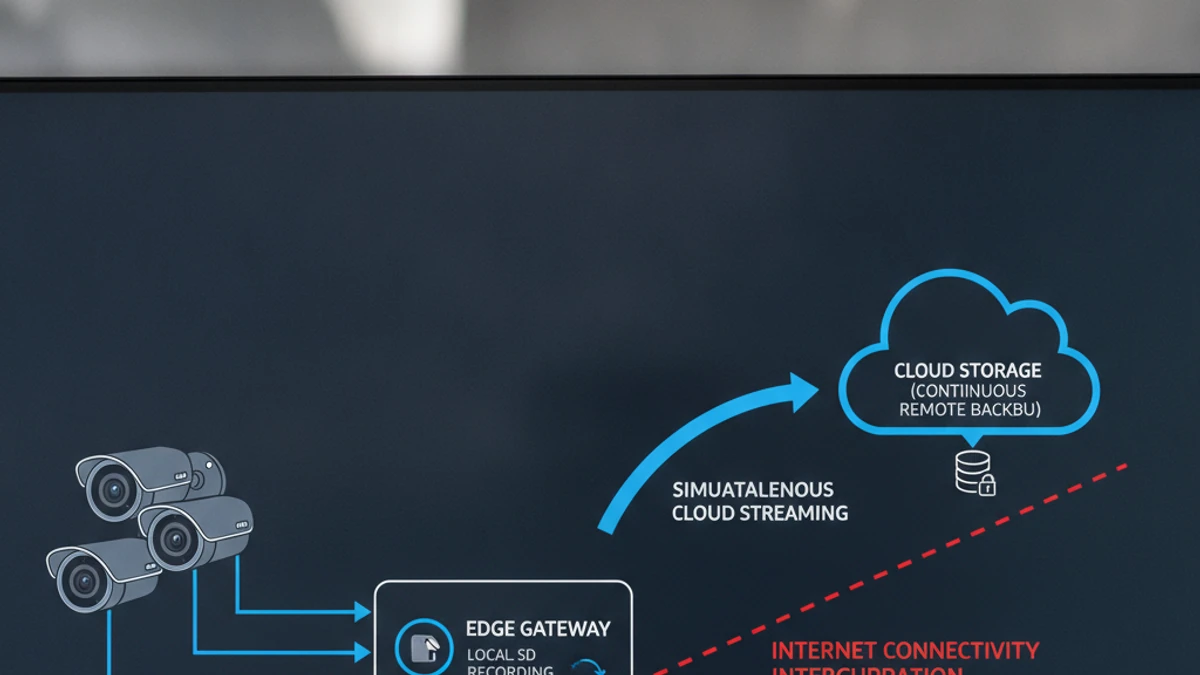
Types of Edge Recording
💾 Camera SD Card
Footage stored directly on a microSD inside the camera. Simplest form, no NVR required. Limited capacity (32–256GB). Useful for failover when NVR is offline.
🖥️ Local NVR / DVR
Traditional on-site recording appliance with hard drives (4–160TB). High storage capacity. Requires maintenance and replacement cycles. Common in legacy installations.
📡 Cloud Gateway Device
Cloud VMS gateway with local storage for edge buffering. Records continuously at site; uploads events to cloud. Provides continuity during internet outages — the hybrid approach.
📁 NAS Storage
High-capacity local storage for VMS software. Separates storage from computing. Used with Blue Iris, ZoneMinder, Milestone, and similar on-premise platforms.
Edge vs. Cloud: Direct Comparison
Why Hybrid Is the Practical Standard for Cloud VMS
Pure cloud recording — streaming every camera frame continuously — requires substantial upload bandwidth. Most cloud VMS platforms use hybrid architecture by design:
📡 Edge (Gateway Device)
- Continuous recording to local gateway storage
- Handles recording continuity during internet outages
- Full-resolution footage available via local access
- Acts as buffer for cloud sync
☁️ Cloud Platform
- AI-triggered events and clips uploaded to cloud
- Live stream accessible remotely via cloud relay
- AI processing runs on cloud GPU infrastructure
- Long-term retention managed by policy
Storage Calculation: Edge vs. Cloud
Cloud AI-triggered event storage is dramatically smaller because only detected event clips are retained long-term. The edge gateway holds continuous footage for the local retention window. Use the storage calculator for your specific requirements.
Questions About Storage Architecture for Your Deployment?
We’ll help you design the right edge + cloud storage architecture for your camera count, retention requirements, and bandwidth constraints.
The True Cost of Running Edge Recording Infrastructure: What “Free” Actually Costs
Edge recording devices, storage media, and maintenance add to infrastructure cost even in hybrid deployments.
The software license is the smallest item in your total cost. The real costs are infrastructure: the server that runs it, the electricity that powers it, the storage that holds footage, the IT time that keeps it running, and the remote access tools required to view it from anywhere. Here is what 10 cameras on a self-hosted VMS actually costs per month.
Self-Hosted VMS (10 cameras, conservative)
$8–$27 / camera / month
Infrastructure + labor. Software license not the main cost.
- No native AI analytics (people counting, ALPR, forensic search)
- No multi-site dashboard
- Remote access requires VPN or cloud relay setup
- You are responsible for uptime, backups, and recovery
iFovea Cloud VMS (10+ cameras)
Contact for per-camera quote
One line item. Infrastructure, AI, and maintenance included.
- 10 AI analytics types included: ALPR, people counting, forensic search, heat maps, and more
- All sites on one dashboard
- Native mobile app remote access — no VPN required
- Cloud infrastructure managed and monitored by iFovea
The honest math
For organizations with a dedicated sysadmin who manages many other systems (where surveillance is a minor time allocation), self-hosted VMS can make sense. For businesses paying someone to manage surveillance infrastructure specifically — or where IT time has opportunity cost — cloud VMS is often cheaper on a per-camera basis when all costs are counted. Use the NVR Replacement ROI Calculator to model your specific deployment.
Open-Source VMS Resource Center
Compare platforms, estimate costs, and plan your migration
Blue Iris Alternative
Frigate NVR Alternative
ZoneMinder Alternative
Shinobi Alternative
NX Witness Alternative
Self-Hosted VMS Security Risks
GPU Requirements for AI Surveillance
VPN vs Cloud Remote Access
Migrate Blue Iris to Cloud VMS
NVR Replacement ROI Calculator
Centralized Camera Management